Smart home technology has transformed vacation rental operations. The right setup improves guest experience, protects your property, reduces your workload, and can even lower operating costs. But with countless devices and platforms available, knowing where to start can be overwhelming.
This guide covers the essential smart home technologies for vacation rentals and how to implement them effectively.
Why Smart Technology Matters
For Your Operations
Remote management capabilities:
- Control access from anywhere
- Monitor property conditions
- Respond to issues without being on-site
- Automate routine tasks
Cost savings:
- Reduced energy waste
- Fewer emergency calls
- Less manual intervention needed
- Preventive issue detection
For Guest Experience
Modern expectations:
- Guests expect technology conveniences
- Self-service options preferred
- Seamless, keyless entry
- Reliable, fast WiFi
Enhanced comfort:
- Easy climate control
- Entertainment options
- Convenience features
Essential Smart Home Technologies
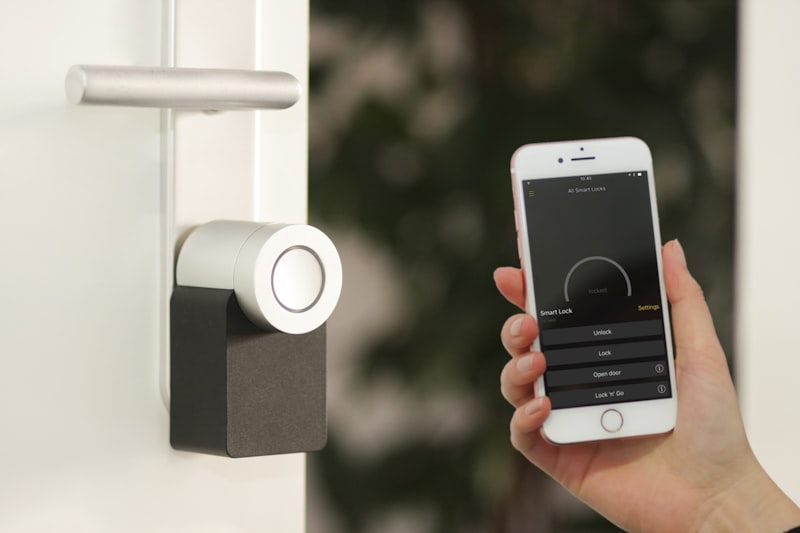
1. Smart Locks (Critical)
The most important smart home investment for vacation rentals.
Why they’re essential:
- Unique codes for each guest
- No physical key management
- Remote access control
- Entry/exit logging
- No lockouts from lost keys
What to look for:
| Feature | Why It Matters |
|---|---|
| Remote code management | Change codes from anywhere |
| Auto-lock | Property secures itself |
| Activity logs | Know who entered when |
| Battery alerts | Prevent lockouts |
| Platform integration | Sync with Airbnb, your PMS |
| Manual backup | Key override for emergencies |
Top options:
- Schlage Encode (reliable, broad compatibility)
- Yale Assure (clean design, good app)
- August Smart Lock (works with existing deadbolt)
- Level Lock (invisible smart lock)
Installation tips:
- Test thoroughly before first guest
- Keep backup batteries on-site
- Set up low-battery notifications
- Have locksmith contact ready
2. Smart Thermostats
Control climate and costs remotely.
Benefits:
- Set temperature limits (prevent extremes)
- Remote adjustment for guest comfort
- Energy savings (unoccupied mode)
- Alerts for HVAC issues
- Occupancy-based adjustments
Popular options:
- Ecobee (room sensors, good integration)
- Nest (learning capability, Google ecosystem)
- Honeywell T6 Pro (simple, reliable)
Vacation rental settings:
- Set minimum/maximum temperatures
- Enable guest access within limits
- Configure unoccupied schedules
- Set up extreme temperature alerts
3. Noise Monitoring
Detect potential problems without invading privacy.
What they do:
- Monitor decibel levels (not conversations)
- Alert for sustained loud noise
- Detect occupancy patterns
- Document for neighbor complaints
Why they matter:
- Early party detection
- Neighbor complaint prevention
- Evidence for disputes
- Peace of mind
Leading options:
- Minut (noise, occupancy, climate)
- NoiseAware (purpose-built for STR)
- Roomonitor (noise and occupancy)
Important: These don’t record audio—they measure sound levels only. Disclose in your listing.
4. Smart Cameras (Exterior Only)
Monitor exterior areas for security.
Appropriate locations:
- Front entrance
- Driveway/parking
- Back yard (common areas)
- Pool area
Never inside: Interior cameras violate guest privacy and platform policies.
What to look for:
- Night vision
- Motion alerts
- Cloud recording
- Weather resistance
- Clear resolution
Disclosure required: Always list cameras in your listing and house rules.
5. WiFi and Network
Fast, reliable internet is expected, not optional.
Requirements:
- Minimum 100 Mbps recommended
- Strong signal throughout property
- Separate guest network
- Easy-to-share credentials
Network setup:
- Guest network isolated from your devices
- Simple, memorable password
- Consider WiFi extenders or mesh system
- QR code for easy connection
Mesh systems for larger properties:
- Google Nest WiFi
- Eero
- Orbi
6. Smart Lighting (Optional but Nice)
Convenience and ambiance control.
Use cases:
- Exterior lights on timers/sensors
- Welcome lighting automation
- Porch lights at dusk
- Interior ambiance options
Simple wins:
- Smart bulbs in key locations
- Motion sensor for entry
- Timer for outdoor lights
7. Water Leak Sensors
Prevent catastrophic damage.
Where to place:
- Under sinks
- Near water heater
- By washing machine
- Near toilets
- Basement or crawl space
What they do:
- Detect water presence
- Alert immediately
- Enable fast response
- Prevent major damage
Options:
- Honeywell Lyric
- Samsung SmartThings
- Flo by Moen (with shut-off valve)
Building Your Smart Home System
Platform Considerations
Smart devices work within ecosystems:
Major platforms:
- Apple HomeKit
- Google Home
- Amazon Alexa
- Samsung SmartThings
For vacation rentals, prioritize:
- Standalone operation (works without platform)
- Integration with property management software
- Reliability over fancy features
- Guest-friendly operation
Integration with Property Management
Many PMS platforms integrate with smart devices:
Common integrations:
- Automatic code generation for guests
- Code delivery with booking confirmation
- Code expiration at checkout
- Thermostat scheduling based on bookings
Check your PMS for supported devices before purchasing.
Installation Approach
DIY-friendly:
- Smart locks (most)
- Thermostats (standard wiring)
- Cameras (wireless)
- Sensors (battery powered)
- Smart plugs and bulbs
Professional recommended:
- Complex wiring situations
- Whole-home systems
- Network infrastructure
- Integrated security systems
Guest Experience Considerations
Keep It Simple
Guests shouldn’t need a tech degree.
Best practices:
- Minimize required interaction
- Clear, simple instructions
- Fallback options available
- Support if issues arise
What Guests Should Control
- Climate (within your limits)
- Entertainment
- Lighting (basic)
- Nothing security-related
What to Automate
- Entry codes (delivered automatically)
- Climate schedules
- Exterior lighting
- Check-out reminders
Instructions to Provide
In welcome materials:
- WiFi name and password
- How to adjust thermostat
- Smart TV basics
- Who to contact for tech issues
Security and Privacy
Guest Privacy
Absolute rules:
- No interior cameras ever
- No audio recording devices
- Disclose all exterior cameras
- Disclose noise monitoring
Platform requirements: Both Airbnb and Vrbo require disclosure of all monitoring devices.
Data Security
Protect your systems:
- Strong, unique passwords
- Two-factor authentication
- Regular firmware updates
- Secure WiFi network
- Don’t share admin access
Network Isolation
Keep guest and owner networks separate:
- Guests can’t access your devices
- Your cameras/systems stay secure
- Compromised guest device can’t spread
Troubleshooting and Reliability
Common Issues
Lock problems:
- Dead batteries (keep spares on-site)
- WiFi connectivity loss
- Code not working
Thermostat issues:
- Guest confusion
- Connectivity drops
- Temperature complaints
WiFi issues:
- Slow speeds
- Connection drops
- Password confusion
Backup Plans
Always have backups:
- Physical key in lockbox (lock backup)
- Manual thermostat override
- Printed WiFi info (if app fails)
- Local contact who can help
Maintenance
Regular tasks:
- Replace batteries proactively
- Update firmware
- Test all devices monthly
- Check camera footage quality
- Verify integrations working
Cost Considerations

Investment Breakdown
| Item | Cost Range | Priority |
|---|---|---|
| Smart lock | $200-$350 | Essential |
| Smart thermostat | $150-$300 | Essential |
| Noise monitor | $150-$200 | High |
| Exterior cameras (2-3) | $200-$500 | High |
| Mesh WiFi system | $200-$400 | Medium |
| Water sensors (3-4) | $80-$150 | Medium |
| Smart lighting | $50-$200 | Low |
Total basic setup: $800-$1,500
ROI Justification
- Eliminated key management costs
- Reduced locksmith calls
- Energy savings (10-20%)
- Prevented water damage (one incident pays for sensors)
- Party prevention (protects property and reputation)
Smart home technology is part of modern vacation rental operations. Learn how our management approach leverages technology to optimize your property’s performance.
How Much Could Your Property Earn?
Get a free, instant estimate of your vacation rental income potential. No obligation, no waiting.
Powered by real market data from Airbtics, a trusted short-term rental analytics platform.
Property Address
Enter your property address to get started